Chapter 29: From Micrograd to PyTorch – Tensors, Autograd, and nn.Module#
In the previous chapter, we built a reverse-mode automatic differentiation engine from scratch.
Our Value class operated on scalars – each number was individually tracked through a
computational graph, and gradients flowed backward one scalar at a time. This was
conceptually illuminating but computationally impractical: real neural networks have
millions of parameters, and operating on them one-by-one would be absurdly slow.
PyTorch extends the same idea to multi-dimensional arrays – tensors – with GPU
acceleration. The gradient tape we built by hand in Chapter 28 is precisely what
torch.autograd does under the hood, but on tensors of arbitrary shape, with
hundreds of optimized backward kernels, and with optional CUDA parallelism.
This chapter bridges the gap between our educational micrograd engine and the industrial-strength framework we will use for the rest of the course.
Show code cell source
import numpy as np
import matplotlib.pyplot as plt
import matplotlib.patches as mpatches
import torch
import torch.nn as nn

# Consistent style for all plots
plt.rcParams.update({
    'figure.dpi': 100,
    'font.size': 11,
    'axes.titlesize': 13,
    'axes.labelsize': 12
})

# Standard color palette
BLUE = '#3b82f6'
GREEN = '#059669'
RED = '#dc2626'
AMBER = '#d97706'
INDIGO = '#4f46e5'

print('PyTorch version:', torch.__version__)
print('CUDA available:', torch.cuda.is_available())
PyTorch version: 2.7.0
CUDA available: False
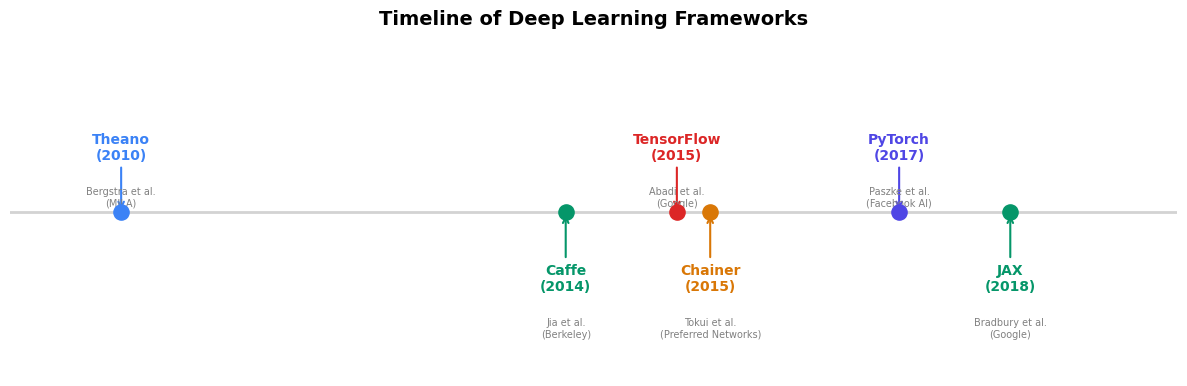
29.1 Historical Context: The Rise of Deep Learning Frameworks#
The history of neural network software follows a clear trajectory from manual gradient derivation toward fully automatic, hardware-accelerated differentiation.
Theano (2010). Developed at the Montreal Institute for Learning Algorithms (MILA) under Yoshua Bengio, Theano was the first widely adopted framework to combine symbolic differentiation with GPU compilation. Users defined computation graphs symbolically, then Theano compiled them into optimized CUDA code. The landmark paper by Bergstra et al. (2010) introduced the paradigm of “define-then-run” that would dominate for years.
Caffe (2014). Yangqing Jia’s framework from Berkeley emphasized speed and
modularity for convolutional networks. Caffe’s prototxt configuration files
made it easy to define standard architectures without writing code, but this
rigidity made experimentation with novel architectures difficult.
TensorFlow (2015). Google’s framework, described by Abadi et al. (2016), adopted Theano’s define-then-run paradigm with industrial-scale engineering. Its static graph approach offered deployment advantages but made debugging notoriously painful – Python served merely as a graph-construction language, with actual execution happening in a separate C++ runtime.
PyTorch (2017). Paszke et al. introduced a radically different approach:
define-by-run (also called “eager execution”). Instead of building a static
graph and then executing it, PyTorch builds the computational graph dynamically
as operations execute. This means standard Python control flow (if, for,
while) works naturally inside models – a crucial advantage for research.
The framework descended from Torch7 (a Lua-based system) and drew on the
ideas of Chainer (2015), which pioneered define-by-run in Python.
JAX (2018). Google’s response to PyTorch, led by Bradbury et al., combined
NumPy-compatible syntax with functional transformations (jit, grad, vmap).
JAX compiles Python+NumPy programs via XLA, offering both eager and compiled modes.
The Convergence
By 2019, TensorFlow added eager execution (TF 2.0), and PyTorch added
compilation (torch.jit). The frameworks converged toward a common design:
eager by default for development, with optional compilation for deployment.
As of 2024, PyTorch dominates research (>80% of ML papers) while TensorFlow
retains a significant deployment footprint.
Show code cell source
# Timeline of deep learning frameworks
fig, ax = plt.subplots(figsize=(12, 4))

frameworks = [
    (2010, 'Theano', 'Bergstra et al.\n(MILA)', BLUE),
    (2014, 'Caffe', 'Jia et al.\n(Berkeley)', GREEN),
    (2015, 'TensorFlow', 'Abadi et al.\n(Google)', RED),
    (2015.3, 'Chainer', 'Tokui et al.\n(Preferred Networks)', AMBER),
    (2017, 'PyTorch', 'Paszke et al.\n(Facebook AI)', INDIGO),
    (2018, 'JAX', 'Bradbury et al.\n(Google)', GREEN),
]

for i, (year, name, authors, color) in enumerate(frameworks):
    ypos = 0.6 if i % 2 == 0 else 0.2
    ax.scatter(year, 0.4, s=120, color=color, zorder=5)
    ax.annotate(f'{name}\n({int(year)})',
                xy=(year, 0.4), xytext=(year, ypos),
                ha='center', va='center', fontsize=10, fontweight='bold',
                color=color,
                arrowprops=dict(arrowstyle='->', color=color, lw=1.5))
    ax.text(year, ypos - 0.12, authors, ha='center', va='top',
            fontsize=7, color='gray')

ax.axhline(y=0.4, color='lightgray', linewidth=2, zorder=1)
ax.set_xlim(2009, 2019.5)
ax.set_ylim(-0.1, 0.95)
ax.set_title('Timeline of Deep Learning Frameworks', fontsize=14, fontweight='bold')
ax.axis('off')
plt.tight_layout()
plt.show()
29.2 Tensors as Generalized Arrays#
A tensor in PyTorch is a multi-dimensional array, conceptually identical to
NumPy’s ndarray but with two critical additions:
Automatic differentiation support – tensors can track operations for gradient computation.
Device placement – tensors can live on CPU or GPU, enabling hardware acceleration.
The mathematical terminology is precise: a scalar is a 0-dimensional tensor, a vector is 1-dimensional, a matrix is 2-dimensional, and higher-rank objects are simply called tensors. PyTorch uses the same convention.
Creating Tensors#
# --- Tensor creation ---

# From Python lists
t1 = torch.tensor([1.0, 2.0, 3.0])
print(f'From list:    {t1}, dtype={t1.dtype}, shape={t1.shape}')

# From NumPy (shares memory -- no copy!)
arr = np.array([[1, 2], [3, 4]], dtype=np.float32)
t2 = torch.from_numpy(arr)
print(f'From NumPy:   {t2.shape}, dtype={t2.dtype}')

# Back to NumPy
arr_back = t2.numpy()
print(f'Back to NumPy: same object? {np.shares_memory(arr, arr_back)}')

# Standard constructors
t_zeros = torch.zeros(2, 3)
t_ones = torch.ones(2, 3)
t_rand = torch.randn(2, 3)  # standard normal
t_eye = torch.eye(3)

print(f'\nzeros(2,3):\n{t_zeros}')
print(f'\neye(3):\n{t_eye}')
From list:    tensor([1., 2., 3.]), dtype=torch.float32, shape=torch.Size([3])
From NumPy:   torch.Size([2, 2]), dtype=torch.float32
Back to NumPy: same object? True

zeros(2,3):
tensor([[0., 0., 0.],
        [0., 0., 0.]])

eye(3):
tensor([[1., 0., 0.],
        [0., 1., 0.],
        [0., 0., 1.]])
Data Types and Device#
# --- Data types ---
t_int = torch.tensor([1, 2, 3])          # default: int64
t_float = torch.tensor([1.0, 2.0, 3.0])  # default: float32
t_double = torch.tensor([1.0, 2.0], dtype=torch.float64)

print(f'Integer tensor: dtype={t_int.dtype}')
print(f'Float tensor:   dtype={t_float.dtype}')
print(f'Double tensor:  dtype={t_double.dtype}')

# Type casting
t_cast = t_int.float()  # int64 -> float32
print(f'After .float(): dtype={t_cast.dtype}')

# Device (CPU by default, GPU if available)
device = torch.device('cuda' if torch.cuda.is_available() else 'cpu')
print(f'\nUsing device: {device}')
t_device = t_float.to(device)
print(f'Tensor on {t_device.device}')
Integer tensor: dtype=torch.int64
Float tensor:   dtype=torch.float32
Double tensor:  dtype=torch.float64
After .float(): dtype=torch.float32

Using device: cpu
Tensor on cpu
Tensor Operations#
PyTorch tensors support the same broadcasting and vectorized operations as NumPy.
Every operation builds a node in the computational graph (when requires_grad=True).
# --- Basic operations ---
a = torch.tensor([[1.0, 2.0], [3.0, 4.0]])
b = torch.tensor([[5.0, 6.0], [7.0, 8.0]])

print('Element-wise addition:')
print(a + b)

print('\nMatrix multiplication:')
print(a @ b)

print('\nBroadcasting (matrix + scalar):')
print(a + 10)

print('\nReduction (sum along axis 1):')
print(a.sum(dim=1))

print('\nReshape:')
print(a.view(4))  # flatten
print(a.view(1, 4))  # row vector
Element-wise addition:
tensor([[ 6.,  8.],
        [10., 12.]])

Matrix multiplication:
tensor([[19., 22.],
        [43., 50.]])

Broadcasting (matrix + scalar):
tensor([[11., 12.],
        [13., 14.]])

Reduction (sum along axis 1):
tensor([3., 7.])

Reshape:
tensor([1., 2., 3., 4.])
tensor([[1., 2., 3., 4.]])
29.3 Autograd on Tensors#
In Chapter 28, we built a Value class that tracked operations on scalars and
accumulated gradients via reverse-mode AD. PyTorch’s autograd does exactly
the same thing, but on tensors.
The key API:
Set
requires_grad=Trueon a tensor to start tracking operations.Call
.backward()on a scalar loss to compute all gradients.Access gradients via the
.gradattribute.
Connection to Chapter 28
Recall that our micrograd Value stored self.grad and self._backward
for each node. PyTorch tensors have the same structure: each tensor with
requires_grad=True stores a .grad tensor and a .grad_fn pointing to
the backward function of the operation that created it.
Replicating the Micrograd Example#
In Chapter 28, we computed gradients of \(f(x, y) = (x + y) \cdot y\) at \(x = 2, y = 3\). Let us verify that PyTorch produces the same result.
# --- Replicating ch28's micrograd example ---

# In ch28, we computed: f(x,y) = (x + y) * y
# df/dx = y = 3, df/dy = x + 2y = 2 + 6 = 8

x = torch.tensor(2.0, requires_grad=True)
y = torch.tensor(3.0, requires_grad=True)

# Forward pass
f = (x + y) * y
print(f'f(2, 3) = {f.item():.1f}')

# Backward pass
f.backward()

print(f'df/dx = {x.grad.item():.1f}  (expected: 3.0)')
print(f'df/dy = {y.grad.item():.1f}  (expected: 8.0)')

# Verify: the grad_fn shows the last operation
print(f'\nf.grad_fn = {f.grad_fn}')
f(2, 3) = 15.0
df/dx = 3.0  (expected: 3.0)
df/dy = 8.0  (expected: 8.0)

f.grad_fn = <MulBackward0 object at 0x127f77d90>
Exact Match
The gradients \(\frac{\partial f}{\partial x} = 3\) and \(\frac{\partial f}{\partial y} = 8\)
match exactly what our hand-built Value class computed in Chapter 28. This is not a coincidence –
both implement the same reverse-mode AD algorithm. The difference is that PyTorch’s
implementation is written in C++ and operates on tensors of arbitrary shape.
Autograd with Tensors (not just scalars)#
The real power of PyTorch emerges when we compute gradients of tensor expressions. Consider a simple linear regression loss:
# --- Autograd on tensor operations ---
torch.manual_seed(42)

# Parameters
W = torch.randn(3, 2, requires_grad=True)
b = torch.randn(2, requires_grad=True)

# Input batch (4 samples, 3 features)
X = torch.randn(4, 3)
y_true = torch.randn(4, 2)

# Forward pass: linear transformation + MSE loss
y_pred = X @ W + b             # (4, 2)
loss = ((y_pred - y_true)**2).mean()

print(f'Loss: {loss.item():.4f}')
print(f'W.grad before backward: {W.grad}')

# Backward pass
loss.backward()

print(f'\nW.grad after backward (shape {W.grad.shape}):')
print(W.grad)
print(f'\nb.grad after backward: {b.grad}')
Loss: 4.3729
W.grad before backward: None

W.grad after backward (shape torch.Size([3, 2])):
tensor([[ 1.5130, -0.1619],
        [ 0.9877, -0.4371],
        [-2.4168, -0.0719]])

b.grad after backward: tensor([ 2.0992, -0.8098])
Important: Zero Gradients
PyTorch accumulates gradients by default. If you call .backward() twice
without zeroing, gradients will be summed. This is occasionally useful (e.g.,
gradient accumulation across mini-batches) but usually a source of bugs.
Always call optimizer.zero_grad() or manually set .grad = None before
each backward pass.
# --- Demonstration: gradient accumulation trap ---
p = torch.tensor(2.0, requires_grad=True)

# First backward
loss1 = p ** 2
loss1.backward()
print(f'After 1st backward: p.grad = {p.grad.item()}')

# Second backward WITHOUT zeroing
loss2 = p ** 2
loss2.backward()
print(f'After 2nd backward (accumulated!): p.grad = {p.grad.item()}')

# Fix: zero the gradient
p.grad = None
loss3 = p ** 2
loss3.backward()
print(f'After zeroing + 3rd backward: p.grad = {p.grad.item()}')
After 1st backward: p.grad = 4.0
After 2nd backward (accumulated!): p.grad = 8.0
After zeroing + 3rd backward: p.grad = 4.0
29.4 nn.Module: Building Neural Networks#
In Chapter 28, we built a Neuron class from Value objects, then composed
neurons into Layer and MLP classes. PyTorch provides an analogous but more
powerful abstraction: nn.Module.
An nn.Module is any differentiable building block:
It has parameters (learnable tensors registered via
nn.Parameter).It defines a
forward()method that computes the output.It automatically collects parameters from sub-modules.
The Module Hierarchy
Just as our micrograd MLP contained Layer objects which contained Neuron
objects, a PyTorch nn.Module can contain other nn.Module instances as
attributes. The framework automatically discovers all parameters recursively
via model.parameters().
XOR Network as nn.Module#
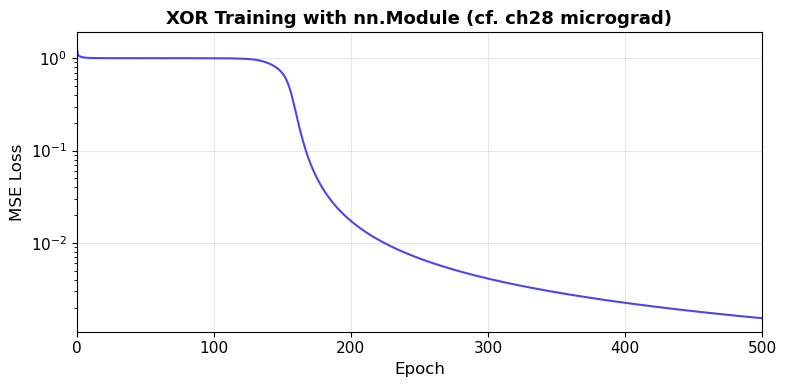
Let us solve the XOR problem – the same task from Chapters 8 and 28 – using
nn.Module. We use the same 2-2-1 architecture.
class XORNet(nn.Module):
    """A 2-2-1 network for XOR, matching the ch28 micrograd architecture."""

    def __init__(self):
        super().__init__()
        self.hidden = nn.Linear(2, 2)   # 2 inputs -> 2 hidden
        self.output = nn.Linear(2, 1)   # 2 hidden -> 1 output

    def forward(self, x):
        x = torch.tanh(self.hidden(x))
        x = torch.tanh(self.output(x))
        return x

# Inspect the model
torch.manual_seed(42)
model = XORNet()
print(model)
print(f'\nTotal parameters: {sum(p.numel() for p in model.parameters())}')
print('\nParameter details:')
for name, param in model.named_parameters():
    print(f'  {name}: shape={param.shape}, requires_grad={param.requires_grad}')
XORNet(
  (hidden): Linear(in_features=2, out_features=2, bias=True)
  (output): Linear(in_features=2, out_features=1, bias=True)
)

Total parameters: 9

Parameter details:
  hidden.weight: shape=torch.Size([2, 2]), requires_grad=True
  hidden.bias: shape=torch.Size([2]), requires_grad=True
  output.weight: shape=torch.Size([1, 2]), requires_grad=True
  output.bias: shape=torch.Size([1]), requires_grad=True
# --- Train XOR network ---
torch.manual_seed(42)
model = XORNet()

# XOR dataset (matching ch28)
X_xor = torch.tensor([[0.0, 0.0], [0.0, 1.0], [1.0, 0.0], [1.0, 1.0]])
Y_xor = torch.tensor([[-1.0], [1.0], [1.0], [-1.0]])  # tanh targets

optimizer = torch.optim.SGD(model.parameters(), lr=0.5)
losses = []

for epoch in range(500):
    # Forward pass
    pred = model(X_xor)
    loss = ((pred - Y_xor) ** 2).mean()

    # Backward pass
    optimizer.zero_grad()
    loss.backward()
    optimizer.step()

    losses.append(loss.item())

# Final predictions
with torch.no_grad():
    final_pred = model(X_xor)

print('XOR Training Results:')
print(f'Final loss: {losses[-1]:.6f}')
print()
for i in range(4):
    x_str = f'({X_xor[i, 0]:.0f}, {X_xor[i, 1]:.0f})'
    print(f'  Input {x_str} -> pred={final_pred[i, 0]:+.4f}, target={Y_xor[i, 0]:+.0f}')
XOR Training Results:
Final loss: 0.001538

  Input (0, 0) -> pred=-0.9639, target=-1
  Input (0, 1) -> pred=+0.9570, target=+1
  Input (1, 0) -> pred=+0.9554, target=+1
  Input (1, 1) -> pred=-0.9686, target=-1
Show code cell source
# --- Plot XOR training curve ---
fig, ax = plt.subplots(figsize=(8, 4))
ax.plot(losses, color=INDIGO, linewidth=1.5)
ax.set_xlabel('Epoch')
ax.set_ylabel('MSE Loss')
ax.set_title('XOR Training with nn.Module (cf. ch28 micrograd)', fontweight='bold')
ax.set_yscale('log')
ax.grid(True, alpha=0.3)
ax.set_xlim(0, 500)
plt.tight_layout()
plt.show()
Micrograd vs. PyTorch: Same Algorithm, Different Scale
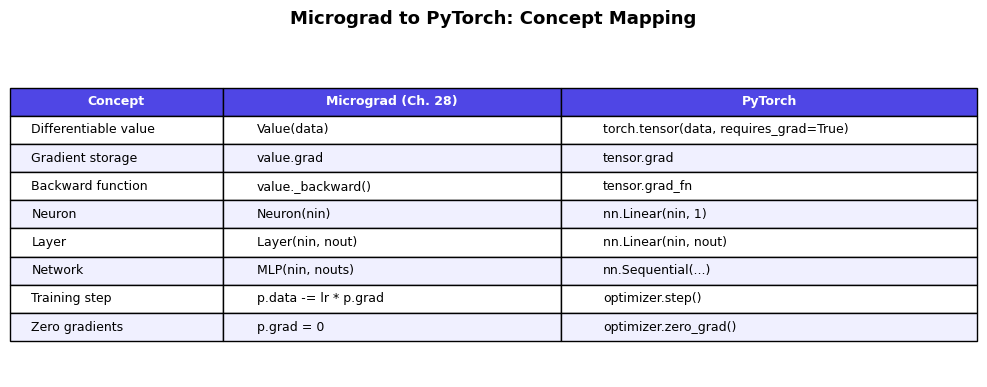
Compare the training loop above with the one in Chapter 28. The structure is identical: forward pass, loss computation, backward pass, parameter update. The only differences are:
We operate on batched tensors instead of individual
Valuescalars.optimizer.zero_grad()replaces our manualp.grad = 0loop.optimizer.step()replaces our manualp.data -= lr * p.gradloop.torch.no_grad()context manager replaces our careful avoidance of gradient tracking during evaluation.
29.5 Common Modules: nn.Linear, nn.ReLU, nn.Sequential#
PyTorch provides a rich library of pre-built modules. The most fundamental are:
Module |
Description |
Parameters |
|---|---|---|
|
Affine transformation \(y = xW^T + b\) |
\(W \in \mathbb{R}^{\text{out} \times \text{in}}\), \(b \in \mathbb{R}^{\text{out}}\) |
|
Rectified linear unit \(\max(0, x)\) |
None |
|
Hyperbolic tangent |
None |
|
Logistic function \(\sigma(x) = \frac{1}{1 + e^{-x}}\) |
None |
|
Chain modules in order |
Inherited |
XOR with nn.Sequential#
For simple feed-forward architectures, nn.Sequential eliminates the need
to write a custom forward() method:
# --- XOR with nn.Sequential ---
torch.manual_seed(42)

model_seq = nn.Sequential(
    nn.Linear(2, 8),
    nn.ReLU(),
    nn.Linear(8, 1),
)

print(model_seq)
print(f'\nTotal parameters: {sum(p.numel() for p in model_seq.parameters())}')

# XOR data (0/1 targets for ReLU-based network)
X_xor = torch.tensor([[0.0, 0.0], [0.0, 1.0], [1.0, 0.0], [1.0, 1.0]])
Y_xor = torch.tensor([[0.0], [1.0], [1.0], [0.0]])

optimizer = torch.optim.Adam(model_seq.parameters(), lr=0.01)
loss_fn = nn.MSELoss()

for epoch in range(1000):
    pred = model_seq(X_xor)
    loss = loss_fn(pred, Y_xor)
    optimizer.zero_grad()
    loss.backward()
    optimizer.step()

# Results
with torch.no_grad():
    final_pred = model_seq(X_xor)

print('\nXOR with Sequential + ReLU:')
for i in range(4):
    x_str = f'({X_xor[i, 0]:.0f}, {X_xor[i, 1]:.0f})'
    print(f'  Input {x_str} -> pred={final_pred[i, 0]:.4f}, target={Y_xor[i, 0]:.0f}')
Sequential(
  (0): Linear(in_features=2, out_features=8, bias=True)
  (1): ReLU()
  (2): Linear(in_features=8, out_features=1, bias=True)
)

Total parameters: 33
XOR with Sequential + ReLU:
  Input (0, 0) -> pred=0.0000, target=0
  Input (0, 1) -> pred=1.0000, target=1
  Input (1, 0) -> pred=1.0000, target=1
  Input (1, 1) -> pred=0.0000, target=0
Custom Module vs. Sequential: When to Use Which#
Rule of Thumb
Use nn.Sequential for straightforward feed-forward architectures where
data flows linearly through layers. Write a custom nn.Module when you need:
Skip connections (ResNet)
Multiple inputs or outputs
Conditional computation
Custom logic in the forward pass
The Forward-Backward Duality#
Every nn.Module defines a forward() method. PyTorch’s autograd automatically
provides the corresponding backward computation. This is the industrial realization
of the principle we explored in Chapter 28: if you can evaluate a function, you
can differentiate it.
The following diagram shows the correspondence between our micrograd building blocks and their PyTorch equivalents:
Show code cell source
# --- Comparison table ---
fig, ax = plt.subplots(figsize=(10, 4))
ax.axis('off')

table_data = [
    ['Concept', 'Micrograd (Ch. 28)', 'PyTorch'],
    ['Differentiable value', 'Value(data)', 'torch.tensor(data, requires_grad=True)'],
    ['Gradient storage', 'value.grad', 'tensor.grad'],
    ['Backward function', 'value._backward()', 'tensor.grad_fn'],
    ['Neuron', 'Neuron(nin)', 'nn.Linear(nin, 1)'],
    ['Layer', 'Layer(nin, nout)', 'nn.Linear(nin, nout)'],
    ['Network', 'MLP(nin, nouts)', 'nn.Sequential(...)'],
    ['Training step', 'p.data -= lr * p.grad', 'optimizer.step()'],
    ['Zero gradients', 'p.grad = 0', 'optimizer.zero_grad()'],
]

table = ax.table(cellText=table_data[1:], colLabels=table_data[0],
                 cellLoc='left', loc='center',
                 colWidths=[0.22, 0.35, 0.43])
table.auto_set_font_size(False)
table.set_fontsize(9)
table.scale(1.0, 1.6)

# Style header
for j in range(3):
    table[0, j].set_facecolor(INDIGO)
    table[0, j].set_text_props(color='white', fontweight='bold')

# Alternate row colors
for i in range(1, len(table_data)):
    color = '#f0f0ff' if i % 2 == 0 else 'white'
    for j in range(3):
        table[i, j].set_facecolor(color)

ax.set_title('Micrograd to PyTorch: Concept Mapping', fontsize=13, fontweight='bold', pad=20)
plt.tight_layout()
plt.show()
Exercises#
Exercise 29.1. Create a 3D tensor of shape \((2, 3, 4)\) filled with random integers
between 0 and 9. Print its shape, dtype, device, and the total number of elements.
Convert it to float32 and verify the dtype changed.
Exercise 29.2. Using PyTorch autograd, compute the gradient of \(f(x) = \frac{e^{2x}}{(1 + e^{2x})^2}\) at \(x = 1\). Verify your answer by comparing with the analytical derivative (note that \(f(x) = \sigma'(2x) \cdot 2\) where \(\sigma\) is the sigmoid function).
Exercise 29.3. Build a custom nn.Module for a network with skip connections:
the architecture should be \(y = \text{ReLU}(W_2 \cdot \text{ReLU}(W_1 x + b_1) + b_2) + x\).
This cannot be expressed as nn.Sequential. Test it on a random input of shape \((4, 8)\).
Exercise 29.4. Demonstrate the gradient accumulation issue: create a parameter \(\theta = 3.0\),
compute \(\nabla_\theta (\theta^3)\) twice without zeroing, and show that the gradient
doubles. Then fix it with param.grad = None.
Exercise 29.5. Rewrite the XORNet class to use nn.ReLU activations instead of
torch.tanh, with \([0, 1]\) targets instead of \([-1, 1]\). How many hidden units
are needed for reliable convergence? Experiment with hidden sizes 2, 4, 8, and 16.
References.
Paszke, A., Gross, S., Massa, F., et al. (2019). “PyTorch: An Imperative Style, High-Performance Deep Learning Library.” Advances in Neural Information Processing Systems 32.
Bergstra, J., Breuleux, O., Bastien, F., et al. (2010). “Theano: A CPU and GPU Math Compiler in Python.” Proc. SciPy 2010.
Abadi, M., Barham, P., Chen, J., et al. (2016). “TensorFlow: A System for Large-Scale Machine Learning.” 12th USENIX Symposium on OSDI.
Bradbury, J., Frostig, R., Hawkins, P., et al. (2018). “JAX: Composable transformations of Python+NumPy programs.” GitHub repository.
Karpathy, A. (2020). “micrograd: A tiny scalar-valued autograd engine.” GitHub repository.